The data contract lives in the skill file - teaching AI your pipeline's schema
Problem statement
Your team already does the data engineering work - schema changes, SQL conventions, pipeline patterns, and data engineering guardrails. What's missing is one central place to capture that knowledge as AI skills, so both your team and your AI can reference it before touching the next job. That's what LeastAction solves.
What's used in the blog
Operators - An operator is reusable Python code that defines how a task is executed, with a standard 4-method contract: initialize, run, check_completion, and finish.
Actions (aka hooks) - An action is a small, reusable piece of Python code that runs at specific lifecycle points to perform supporting tasks, such as dependency checks, alerts, notifications, syncs.
Catalog - The catalog is where every reusable item lives - operators, actions, payloads, and skills.
Solution
The short version
A wiki page is something your team can read. A skill is something your AI can read before taking any action.
In LeastAction, a skill is a catalog item (item_type: skill) that defines everything about the skill - its purpose, instructions, rules, behavior, workflows, and any other context needed to use it effectively.
One skill can be used in three places:
- when LeastAction's AI writes an operator or payload,
- when an action asks the AI to explain a failed task, and
- when someone asks a question about a generated report.
Treat a skill like something you keep up to date, the way you would let the rest of the team know what changed. If the skill is stale, the AI works off the old rules.
Here's what it looks like in a real setup:
Below is the pipeline the rest of this section refers to - LeastAction's live dbt_sales_reporting workflow is a 7-task pipeline: a seed task produces the raw sales rows, three transforms build it up, a row-level gate (green) checks the result, and two reports are what a business user actually sees:
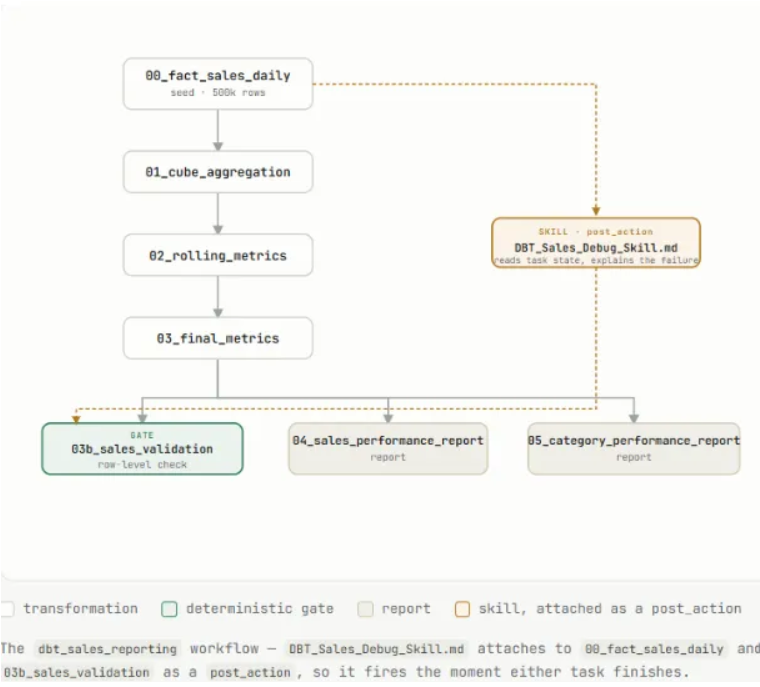
Once it's attached, the AI has the details it would otherwise have to figure out on its own. The skill names real tasks in this pipeline and what their failures mean: if 03b_sales_validation reports "Σ product revenue ≠ grand total", a join is duplicating rows somewhere upstream, so revenue gets counted twice. Go look at 01_cube_aggregation and the seed join grain. It also names two other skills to load alongside it, DBT_Postgresql_Sales_Pipelines_Skill.md for the pipeline layout and DBT_Postgresql_Sales_Data_Contract.md for the schema rules. So the AI gets the layout, the rules, and the live task state in one call, rather than working backwards from a stack trace.
Here's the actual sequence behind that config: the gate fails → the backend invokes the action with the failing task's state already attached → the action looks up each name in skill_names against the catalog and pulls its content → the skill content and the task state go to the AI in one call → the agent's analysis is routed wherever notify points. The JSON below is the input to that sequence, not the sequence itself:
{
  "skill_names": [
    "DBT_Postgresql_Sales_Pipelines_Skill",
    "DBT_Postgresql_Sales_Data_Contract"
  ],
  "include_task_context": true,
  "notify": {
    "slack_url": "https://hooks.slack.com/services/xxx/yyy/zzz"
  }
}
Writing your first skill
Four steps to go from a doc your team already has to something the AI reads.
- Write it as markdown, one topic per skill. Take the convention doc you already have and paste the relevant part into a new skill. Keep each one narrow. Naming rules and error handling work better as two skills than one that covers both, because you can then attach whichever one fits the job.
- Fill in the name, description, and tags. This is how someone on your team finds the skill later, and how the AI finds it when it searches the catalog. Without them you end up with three people writing three versions of the same thing.
- Attach it where the work happens. Tick it in the Skills selector before you generate an operator, action, or payload. Name it in skill_names on the action that handles failures. Set skill_laui on a folder or report for Report Explorer.
- Update it when you change what it describes. If you rename a column or add a task, edit the skill in the same pull request. Nothing will remind you, and a skill that describes last month's pipeline is worse than no skill at all.
Know the edges
- A skill does nothing until something attaches it. Writing it is half the job.
- When you attach several skills, they get joined together in the order you picked them. One 50,000-character file with every rule you own makes the prompt long and buries the rule you actually needed. A few smaller skills you can mix and match work better.
- For Report Explorer, LeastAction checks the report first, then the folder, then the project root, and uses the first skill it finds. So a skill on the report quietly overrides the one on its folder. Worth checking if a chat answer looks off.
- A skill is only as current as the last time someone edited it. Nothing checks it against your real schema. If you rename a column and forget the skill, the AI carries on with the old rules and nothing warns you.
Wiki page vs. skill file
They're both markdown. They hold the same kind of content - naming rules, schema definitions, do's and don'ts. What changes is who's reading it, and when.
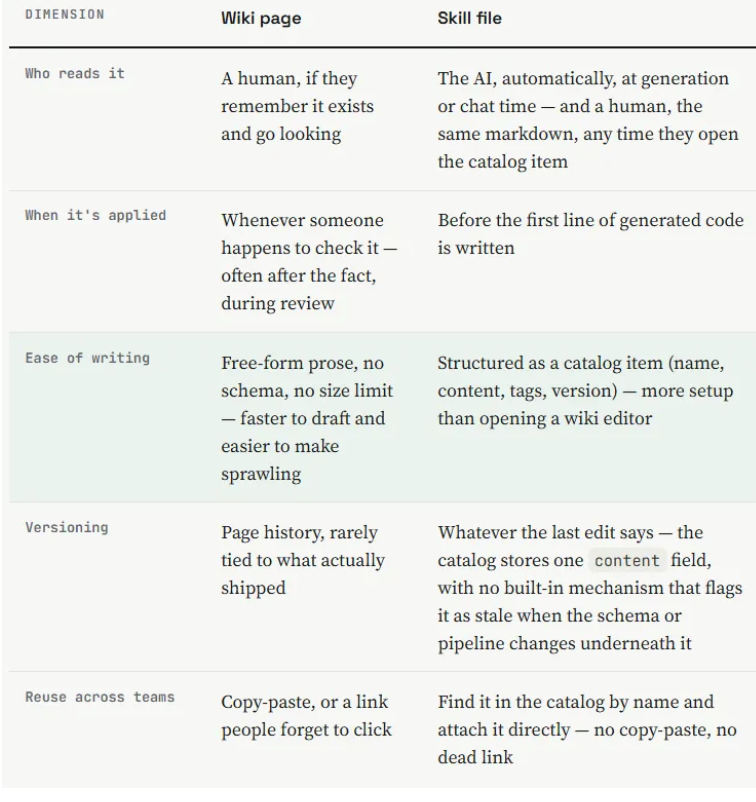
Keep the wiki for onboarding narrative. Move anything you want enforced into a skill.
Setting up AI skills in LeastAction
This walks through attaching a skill, the thing described in this blog. A skill is a catalog item holding your schema rules or conventions as plain markdown. Attach it to a generation flow, a debug action, or a report, and the AI reads it before it writes code or explains a failure.
Every screenshot here is a real capture of the sample_project_preview workspace, with the part that matters boxed in orange.
Before you start
- A project in the LeastAction catalog. A skill has to be attached to something, so you need at least one of these: a generation flow, a debug action, or a folder or report.
- Access to the catalog UI for that project, with permission to create a skill item.
- For the debug path: the LeastActionAgentDebug action in your catalog. It ships with the platform under action → LeastActionLabs. You also need an AI connection with an API key set, since that is what the action uses to call the model.
- For the Report Explorer path: a folder or html_report item you can edit, so you can set its skill_laui.
Setting it up
Step 1. Write the skill
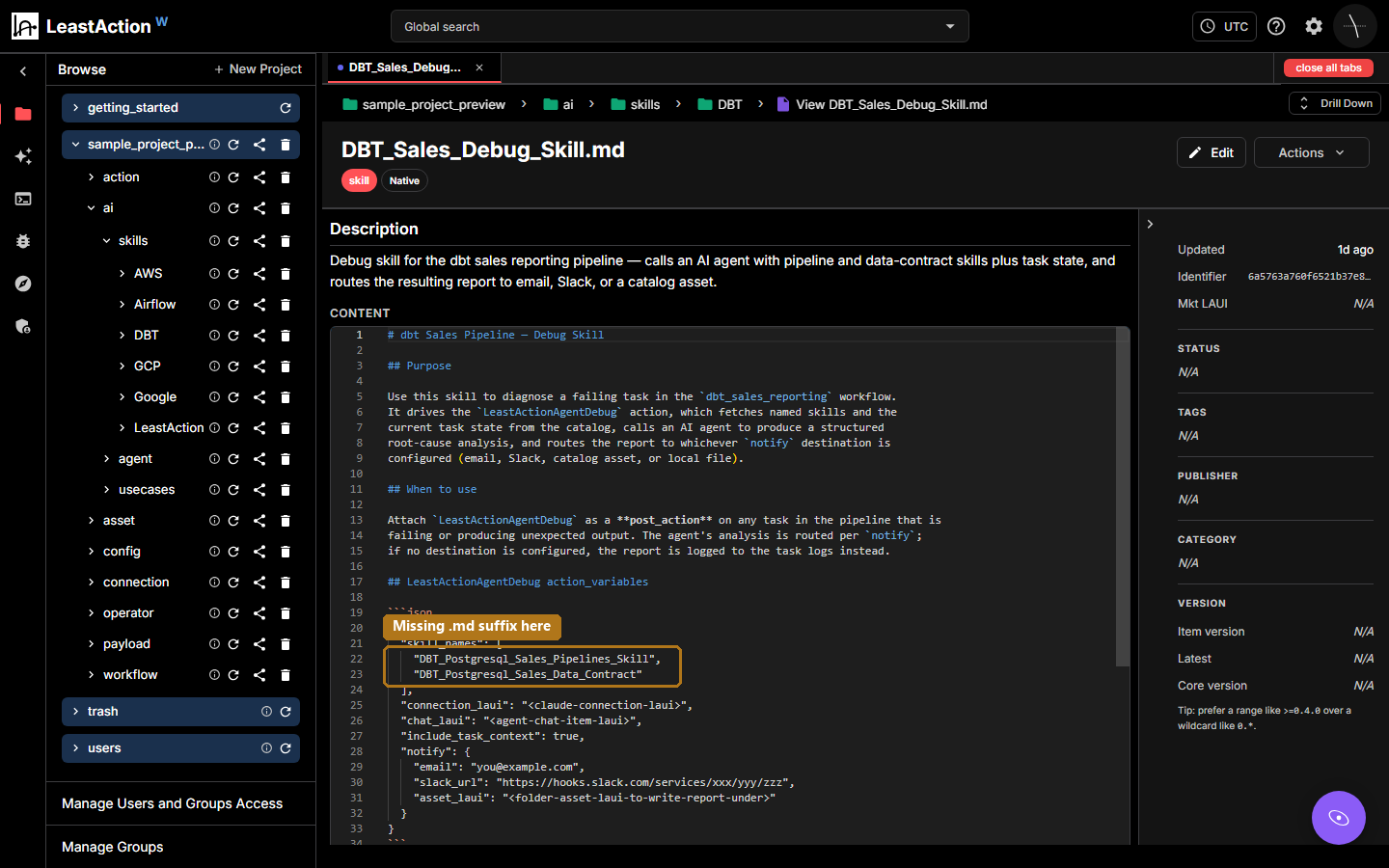
Create a new item with item_type: skill in the catalog, under whichever project or folder it belongs in. Give it a name you will type again later, because LeastAction matches skill names character for character. Add a description, then write your rules into the content field as markdown. You get up to 50,000 characters.
Keep each skill to one topic. Naming rules and a data contract work better as two skills than one that covers both, since you can then attach whichever one fits the job.
The real DBT_Sales_Debug_Skill.md item: its name, description, and the content field holding the markdown. Boxed on lines 21 to 23 is a skill_names list missing the .md suffix the catalog stores. That is the exact mistake Step 3 is about.
Step 2. Attach it where the work happens
Where you attach it depends on what should read it.
- Writing code. In Service AI (AI > Operator / Action / Payload), open the Skills selector before you generate and tick the skill. Its content goes to the top of the prompt. Tick several and they go in the order you picked them.
- Handling a failure. On LeastActionAgentDebug, set skill_names to a list of exact skill names. The action looks each one up and passes it to the AI along with the failing task's state.
- Report Explorer. On a folder or a report, set skill_laui to the skill's catalog id. LeastAction checks the report first, then the folder, then the project root, and uses the first skill it finds.
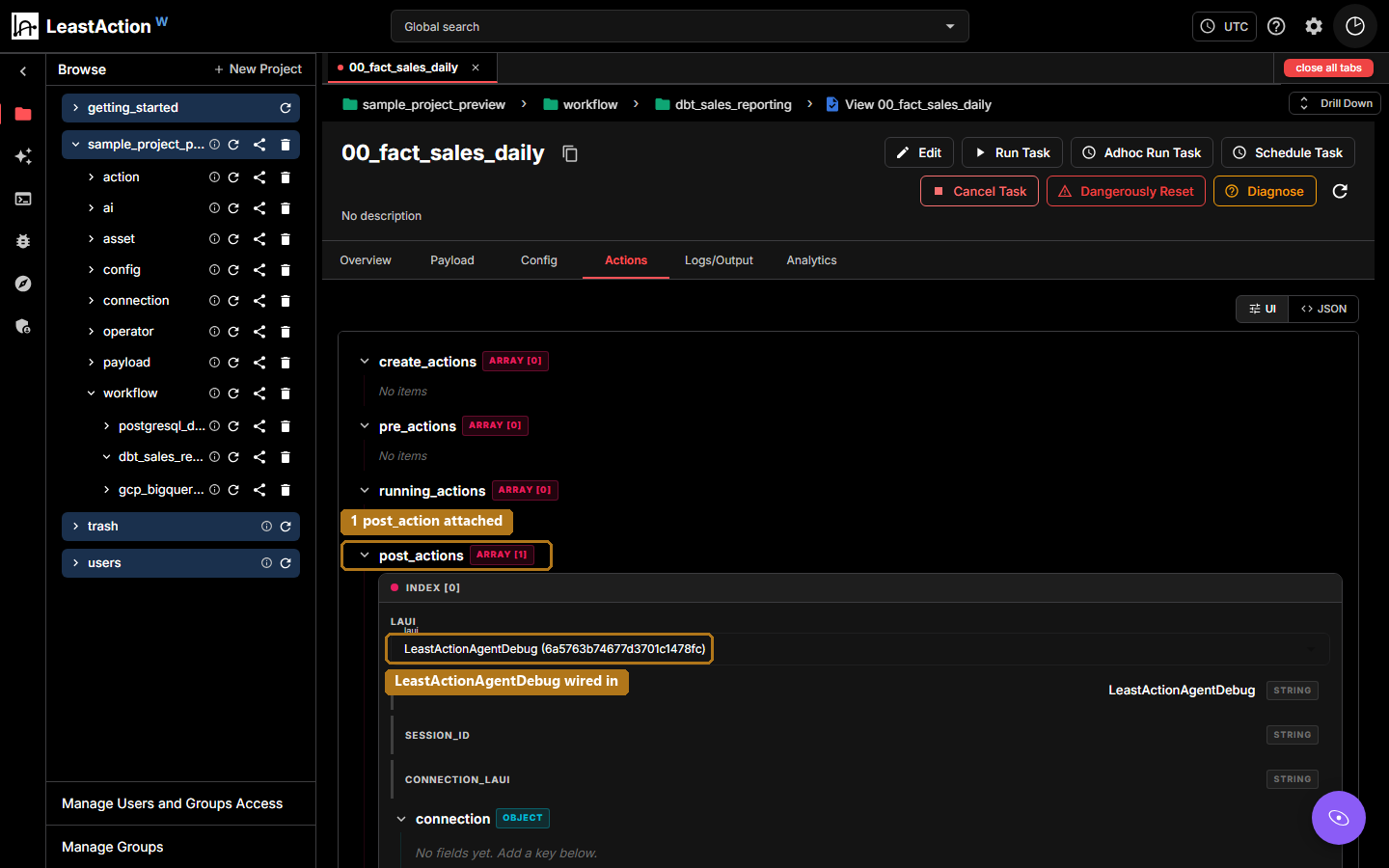
Here is the debug path on a real task. LeastActionAgentDebug is attached to 00_fact_sales_daily, the seed task of the dbt_sales_reporting pipeline, as the only entry in that task's post_actions.
The Actions tab on 00_fact_sales_daily, with LeastActionAgentDebug attached as post_actions[0].
Step 3. Check that it is actually being read
There is no validation step that tells you a skill is wired up correctly. You have to look at what used it.
For code generation, read what LeastAction produced and see whether it followed your rule. Did it qualify table names the way the skill said to?
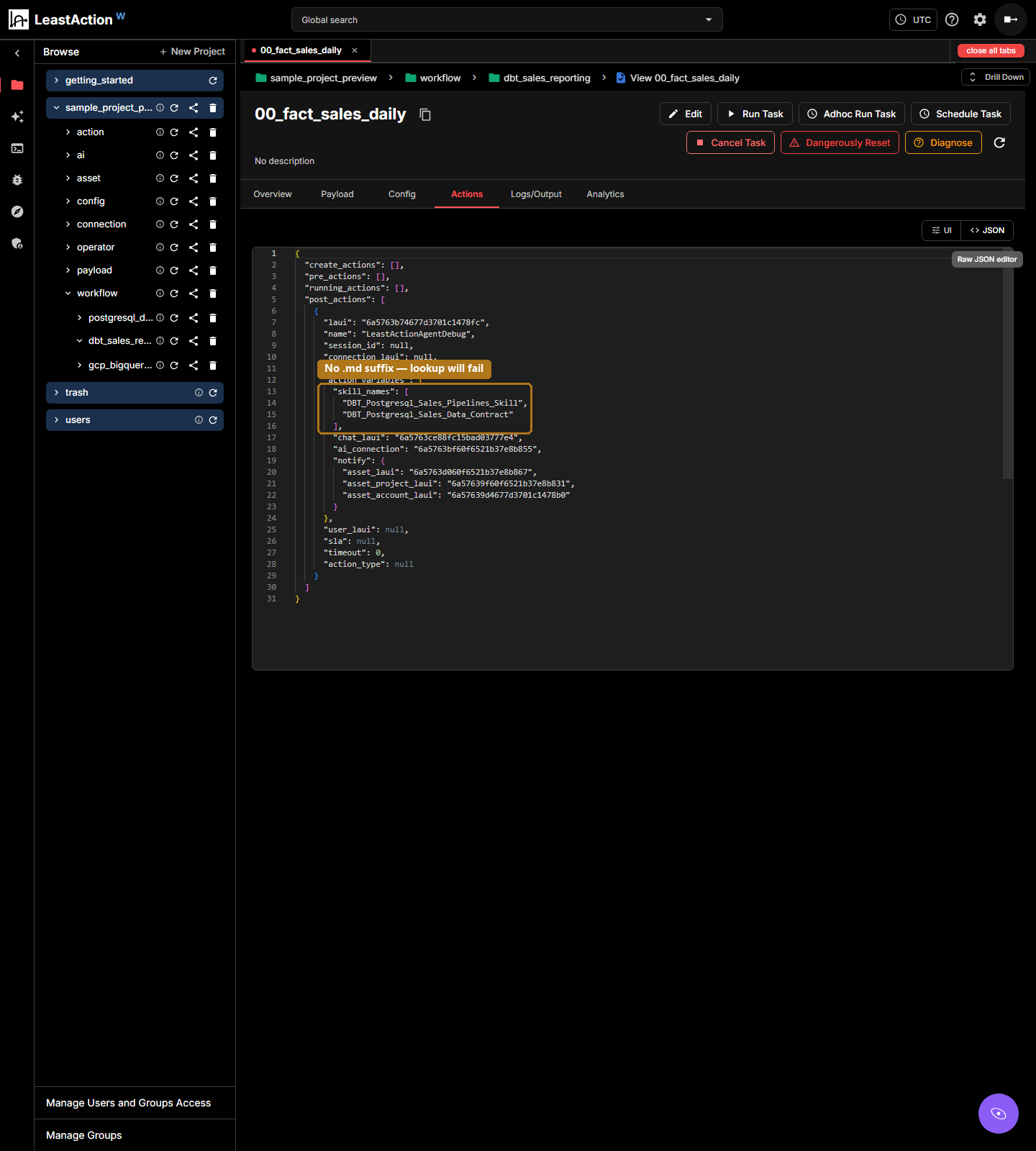
For LeastActionAgentDebug, open the raw JSON view of the task's Actions tab. It shows exactly which names will be looked up. Check every one against the catalog before you trust the report it writes.
The same post_action in raw JSON. skill_names lists DBT_Postgresql_Sales_Pipelines_Skill and DBT_Postgresql_Sales_Data_Contract, neither with the .md suffix the catalog stores them under. This task will report "(not found in catalog)" for both until the names are fixed.
Using it day to day
Step 1. Just run things as usual
Nothing changes in how you work. Generate an operator, run the task, open Report Explorer, the same as before. The skill gets pulled in on its own, and there is nothing extra to remember each time.
In this workspace, dbt_sales_reporting has 7 tasks: 00_fact_sales_daily, 01_cube_aggregation, 02_rolling_metrics, 03_final_metrics, 03b_sales_validation, 04_sales_performance_report, and 05_category_performance_report. The debug action sits on the seed task, 00_fact_sales_daily.
Step 2. Check the skill is doing something
The question worth asking is whether the output follows the skill, not whether the skill got attached. Those are different things.
For this pipeline: fix the .md suffix in skill_names, and the next failure downstream of 00_fact_sales_daily gets a real root cause instead of two "(not found in catalog)" lines. Before the fix, the report still gets written and sent. It is just working without your rules, and it will not tell you that unless you read the skill sections in the output.
So that is the test. Change the name, run it again, and compare the skill sections in the two reports. If one still says "(not found in catalog)", the name is still wrong. Check the spelling in the catalog under ai → skills → DBT before you assume the content is the problem.
LeastAction - source-available, self-hosted data orchestration.
Comments (0)
to join the conversation.
No comments yet — be the first to say something.