How MCP access control works in LeastAction
What an agent is allowed to reach, decided by the checks that already answered the browser.
How MCP access control works in LeastAction
An MCP server hands an agent tools that read real data and change real state, so the question worth answering early is not what the tools can do in principle, but what any given agent is allowed to reach. There are two ways to answer it: give MCP its own permission model, with its own roles and rules, or reuse the permissions the product already enforces and add only the part MCP introduces. We took the second, to avoid running two authorization systems over the same data. The tools were always going to reach that data through the same API the frontend does, so a separate model would have meant a second set of rules to keep in step by hand. When the two drift, nothing tells you which one is wrong. The rest of this post is how we built it.
Part 1 · High-level design
An allow-list over what the user delegates
The product is already access-controlled, and MCP doesn't change that. The agent acts as the user, not as a separate service account, so it gets the same permissions the user already has. The same checks that apply in the browser still apply here.
What MCP adds is one extra layer: which tools the agent is allowed to use on the user's behalf. That is the delegation we added.
Every tool starts with the same can_invoke(tool) check, before it even looks at the arguments. If the user hasn't delegated a tool, the tool returns a normal result containing an error message rather than failing as a tool call. This lets the model understand the refusal and try another approach. More importantly, the refused tool never reads anything or performs any action. Even the connection lookup that would retrieve a credential happens only after the permission check.
The delegation list belongs to the user. If it isn't set, there are no tool-level restrictions. If it is set, a tool must be on that list to run. It is read once when the request arrives and not consulted again.
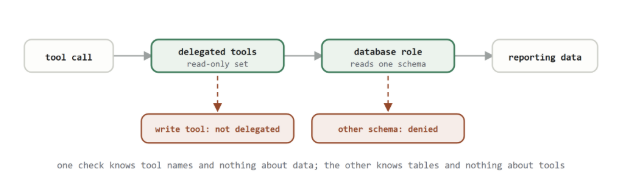
The allow-list bounds which tools the agent can invoke. The database grant bounds which data they can reach. Neither one is a backup for the other.
Part 2 · Low-level design
Where each check sits
A call is matched to the tool registered under that name, and from there it passes three permission checks in a fixed order, each answering a different question.
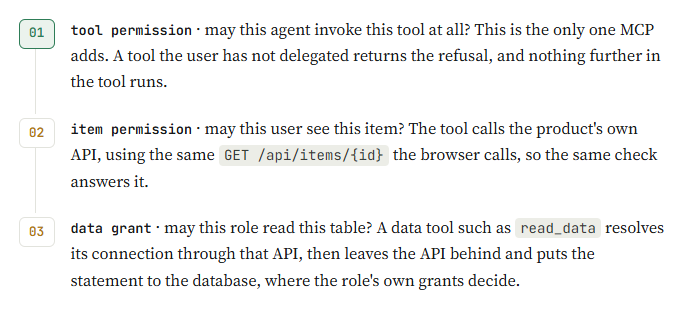
The order matters. Checking the delegated list is cheap and happens in memory, so it runs before the connection is fetched. For a connection, the stored content is the credential. Reversed, a tool nobody had delegated would still have pulled a credential into memory on its way to refusing.
Going back through our own API is why we never reimplemented item permissions. The agent's catalog read is not modelled on the browser's read, it is the same read, answered by the same relation check for view, edit or own. Anything we would have had to keep in sync is instead a thing we do not maintain twice.
Part 3 · What is shared, and how access ends
Where a credential outlives its request
Isolation between concurrent users is the easier part. Every request carries its own user identity and delegated tool list, so two people using the agent at the same time cannot accidentally read each other's state.
The cloud proxies are a little different. Each connection gets its own long-running process, started with that connection's credentials and shut down when it becomes idle. The process is tied to the connection, not to the user. So if two engineers have access to the same warehouse, they share the same proxy process, and the credential stays available inside that process between calls.
The permission check still happens on every call. It doesn't move into the proxy pool. This means a running process can't keep serving someone who has since lost access to the connection.
The delegated tool list is also checked on every call, so removing a tool takes effect immediately. The one limitation is access that has already been handed to a running agent: it lasts for the lifetime of that session, and we don't currently have a way to terminate it early.
Failures on either path are returned as normal content that the model can act on. They don't trigger any separate alerts.
Part 4 · A poisoned ticket, traced
Tracing a poisoned support ticket
In December 2025, an AWS engineer used Kiro, Amazon's coding agent, while working on an issue in AWS Cost Explorer. According to reporting from the Financial Times, Kiro determined that the environment should be deleted and recreated, and Cost Explorer in one mainland China region was unavailable for about thirteen hours. Amazon confirmed the outage and its duration, but disputed the characterization that the incident was caused by AI, saying instead that it resulted from user error and a misconfigured access-control role.
The important detail for our design is the permission model. The engineer had broader permissions than expected, and Kiro operated with those permissions. Amazon says the same underlying access-control problem could have occurred with another developer tool or with a manual action.
That exposes a limitation in treating an agent simply as the user. The agent inherits the user's permissions, but it does not automatically inherit the human processes around those permissions: review, a second pair of eyes, or a deliberate pause before a destructive operation.
Our delegated tool list addresses only one part of that problem. It controls which tools the agent may invoke. It does not determine what a permitted tool can do. The database grant still determines which data the tool can reach, and the connection itself needs to carry enough information to distinguish where that access applies.
For our system, the two controls therefore serve different purposes: the delegated allow-list limits the agent's available actions, while the underlying database permissions limit the data those actions can reach. Both are necessary, and neither should be treated as a substitute for the other.
Source: https://www.docker.com/blog/coding-agent-horror-stories-the-agent-that-deleted-production/
Full access vs read-only production
The gates decide what a request may do. Which dataset they sit in front of is a separate decision, and both options are defensible; they fail differently.
| Dimension | Full access | Read-only production |
|---|---|---|
| Setup cost | A replica or snapshot to provision and keep current, plus a role and a connection. | One database role and one connection. No new infrastructure. |
| A successful injection yields | Whatever is in the scoped dataset, usually a subset, often masked. | Every table the role can reach, including live customer data. |
| Debugging fidelity | Replication lag and subsetting mean the row that broke may not be present. | The actual rows, at the actual time. |
| When the grant is wrong | Loud. The agent reports missing tables or empty results and you go fix it. | Silent. A grant wider than intended is indistinguishable from a correct one until it is not. |
| Best recommended for | Short, time-boxed work where making the change is the point, with the session supervised. | Everyday, open-ended use, including scheduled or unsupervised sessions. |
Limitations we know about
These all follow from reusing the product's own permissions instead of building a second model.
- The check runs when a tool is invoked, not when the agent asks what tools exist. The agent is shown all of them, so the ones it cannot use still take up context and still get chosen before being refused.
- Nothing distinguishes agent traffic from browser traffic in the logs; the acting user is recorded, but not what they were acting through. Data tools and cloud proxies do not appear in that log at all.
- Delegation is per user and per tool, never per connection. Being able to view the production connection, plus a data tool delegated, is production access. Connections carry no environment marker.
- Read tools return credentials. Fetching a connection returns its stored content, which is the credential in plain text, for anything the user can view.
LeastAction: source-available, self-hosted data orchestration. leastactionlabs.com
Comments (0)
to join the conversation.
No comments yet — be the first to say something.