Debug at Scale : Debugging the things that don't fail
Someone edits the load script for fact_sales_daily. The revenue column definition changes from DECIMAL(15,2) to DECIMAL(15,1), reducing its precision from two decimal places to one. Postgres accepts it. The load runs, exits 0, every task goes green. The dbt models downstream build fine. The dashboards render. No one gets paged, because nothing broke.
Every revenue value written to that table now rounds to one decimal place. On one row that's a fraction of a cent. Across 500,000 rows, rolled up into margin, profit, and the weekly revenue figure the sales team reads on Monday, it's a real discrepancy with no obvious cause.
You find it eventually. Someone in finance says a number looks off. You open the logs; the logs say every step succeeded, because every step did. You spend the afternoon walking the number backward through every table between the dashboard and the load, until you reach the one column that changed shape three days ago.
That's the class of bug this post is about.
Usually schema drift is caught through predefined checks: enumerate the expected columns and types, assert them after each load, diff the results. Those checks cover the properties you wrote a line for. It says nothing about the drift you didn't - which, in practice, is most of it. LeastAction provides a mechanism that attaches to your pipeline, queries the real table the moment the load finishes, and checks what it finds against a written contract. Here's how it works.
Before we get started
If you're new to LeastAction, here's a quick overview:
Pipeline - a set of tasks chained by dependency, like a DAG.
The load in the opening example is the first task of dbt_sales_reporting, a demo pipeline LeastAction ships on install. The pipeline has 7 tasks.
Task - one unit of work in a pipeline. Every task has three parts: a connection (the system it talks to - here, Postgres), an operator (the Python that does the work), and a payload (the parameters for one run).
The task 00_fact_sales_daily pairs the Postgres connection with the PostgresqlExecuteSQL operator and a payload holding the CREATE TABLE / INSERT SQL.
Operator - the reusable Python behind a task.
PostgresqlExecuteSQL opens the connection, runs the payload SQL, returns the result.
Point a task at a different operator and the same three-part shape runs a dbt model, an API call, or a file copy - the three dbt tasks later in this pipeline use a DBTRunModel operator that runs dbt over HTTP.
Action (hook) - a small, reusable piece of code LeastAction runs around a task's lifecycle.
Attached as a post_action, it runs when its task finishes, on that task's run, with no schedule of its own. The task's operator still does the work; the action runs around it.
Skill - a Markdown document attached to an action to give the agent scoped reference material. LeastAction looks skills up by exact name.
What we built
LeastActionAgentDebug is an action that runs an AI debugging pass after the seed load. It's attached to the task 00_fact_sales_daily as a post_action, so it runs on every completion of that task.
Each run, it gets three things:
- The skill document that states what the fact_sales_daily table should look like: columns and types, primary key, nullable columns, value ranges, expected row count.
- The task's own state - what executed, the payload it used, and how it finished.
- A live tool called inspect_data that runs a read-only SQL query against the task's connection: information_schema.columns, a row sample, a count, whatever the agent decides it needs.
Note that the agent reads the schema by querying the table directly, the way you would from a SQL client, within seconds of the load finishing. It then checks what it found against the skill document and reports where the two have diverged.
Where LeastActionAgentDebug sits in the pipeline
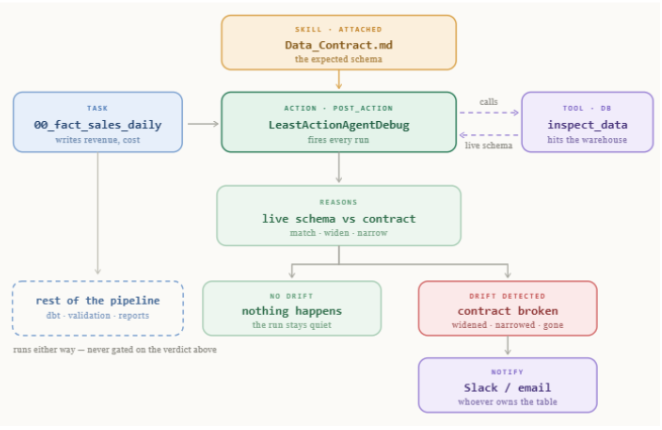
dbt_sales_reporting is a seven-task pipeline that turns raw sales data into the dashboards a sales team can use. The first task in the pipeline is the seed task and also the focus of this blog post.
Seed task
The task 00_fact_sales_daily builds the fact_sales_daily table. Everything downstream reads that table, aggregates it, or reports on numbers derived from it and therefore depends on this table being right.
LeastActionAgentDebug is attached to the task 00_fact_sales_daily as a post_action, so the check runs inside that task's own lifecycle. The Data_Contract.md skill is attached to the action; the agent reads it as the reference during the check. On every run of the seed, the action calls inspect_data, pulls the live schema and a row sample from the fact_sales_daily table, and reasons about them against the contract. It writes its report to the [DebugReports](ADD URL HERE) asset folder, and sends a Slack message or email when notify is configured for one. Downstream tasks are not gated on the result; they run on their schedule.
Subsequent tasks
- Three dbt models - 01_cube_aggregation, 02_rolling_metrics, 03_final_metrics run fact_product_agg_daily_stage1 → fact_product_agg_daily_stage2 → fact_product_agg_daily, building the table into a metrics cube.
- Validation - 03b_sales_validation runs count and null checks on the metrics output.
- Two reports - 04_sales_performance_report and 05_category_performance_report render the dashboards and save them as LeastAction assets. (See [Metric standardization](ADD URL HERE) for details)
Does it actually reason, or is it just noticing that a number changed?
Fair question. We ran the same change to the fact_sales_daily table in both directions, to see whether the agent was reasoning about the data or pattern-matching on "a type changed."
Case 1 - Widening: DECIMAL(15,2) → DECIMAL(15,4) on revenue and cost. The load succeeds. No arithmetic breaks downstream. LeastActionAgentDebug calls inspect_data and comes back with:
This is a widening - no data loss on read - but it violates the contract's explicit precision guarantee. Downstream dbt models and metrics expecting 2-decimal currency values will now receive 4-decimal values, causing silent metric corruption.
Case 2 - Narrowing: DECIMAL(15,2) → DECIMAL(15,1) on the same columns. Same task, same action. The verdict changes, because this direction drops information on write:
This is a narrowing change - a correctness risk. Existing revenue/cost values with 2 decimal places will be rounded or truncated on write, silently corrupting downstream metrics (profit, margins, aggregates).
Each direction produced its own verdict, because the agent reasoned about what the change does to the numbers already in the table.
Once it has a verdict, it writes the report as a catalog asset. When notify points at an email address or a Slack webhook, it sends that too. You're notified the same way in both directions; the difference is in what the report says when you open it.
What it actually took to make this work
Three changes turned this from an idea into something that fires on the case that matters.
Give the agent a live tool. The action calls LeastAction's AI endpoint with tool-calling on and exactly one tool exposed: inspect_data, a read-only query against the task's own connection. The agent's reasoning then runs on the table's current state, read at check time.
Run the check on every completion. By default a post_action runs only when its task fails. A precision change doesn't fail the load - the INSERT still succeeds against the narrower column - so a failure-only trigger never sees it. Running on every completion is what puts the agent in front of this case.
Write the contract where the agent can find it, exactly. The skill lookup is an exact name match on skill_names. A wrong name means the agent reasons with no contract and reports that everything is fine, with nothing to compare against. The contract also has to state the property you care about: a document listing only column names gives a precision check nothing to land on.
Know the edges
Four things to weigh before pointing this at production.
- The contract has to be attached. The agent doesn't already know your schema. The skill must be listed in skill_names and named exactly, or the check runs with no contract and quietly reports "fine."
- It's only as good as what the contract states. The agent uses inspect_data well, but it needs the skill to spell out precision, nullability, ranges - whatever actually matters - to have something concrete to reason against.
- It reads and reports; it doesn't block. inspect_data won't stop the next task from running on bad data. A hard stop is still a deterministic check's job. This tells you why, quickly.
- Payloads and query results reach the model unredacted. Whatever inspect_data returns is what gets reasoned over. Check what's in the table before pointing this at a production connection.
The check runs every time the seed finishes, whether or not anything looks wrong. That's what it takes to catch drift that was never going to break anything on its own.
Setting it up
Here's the whole walkthrough. It's three steps.
Before you start
You'll need:
- An existing pipeline in LeastAction - at minimum, one task that loads data into a table (a seed, an ETL step, a dbt model output).
- Access to the LeastAction catalog UI for that project.
- The LeastActionAgentDebug action in your catalog. It ships with the platform under action → LeastActionLabs.
- An AI connection with an API key configured. Create one under Connections if you don't have one already - this is what the action authenticates with when it calls the model.
Without that connection, the action has nothing to call.
Step 1 - Write the contract as a skill
Start by writing down what the table is supposed to look like. In LeastAction, that's a skill item in the catalog: a plain markdown document listing the columns you expect, their types, and - if it matters - the precision or scale on numeric columns.
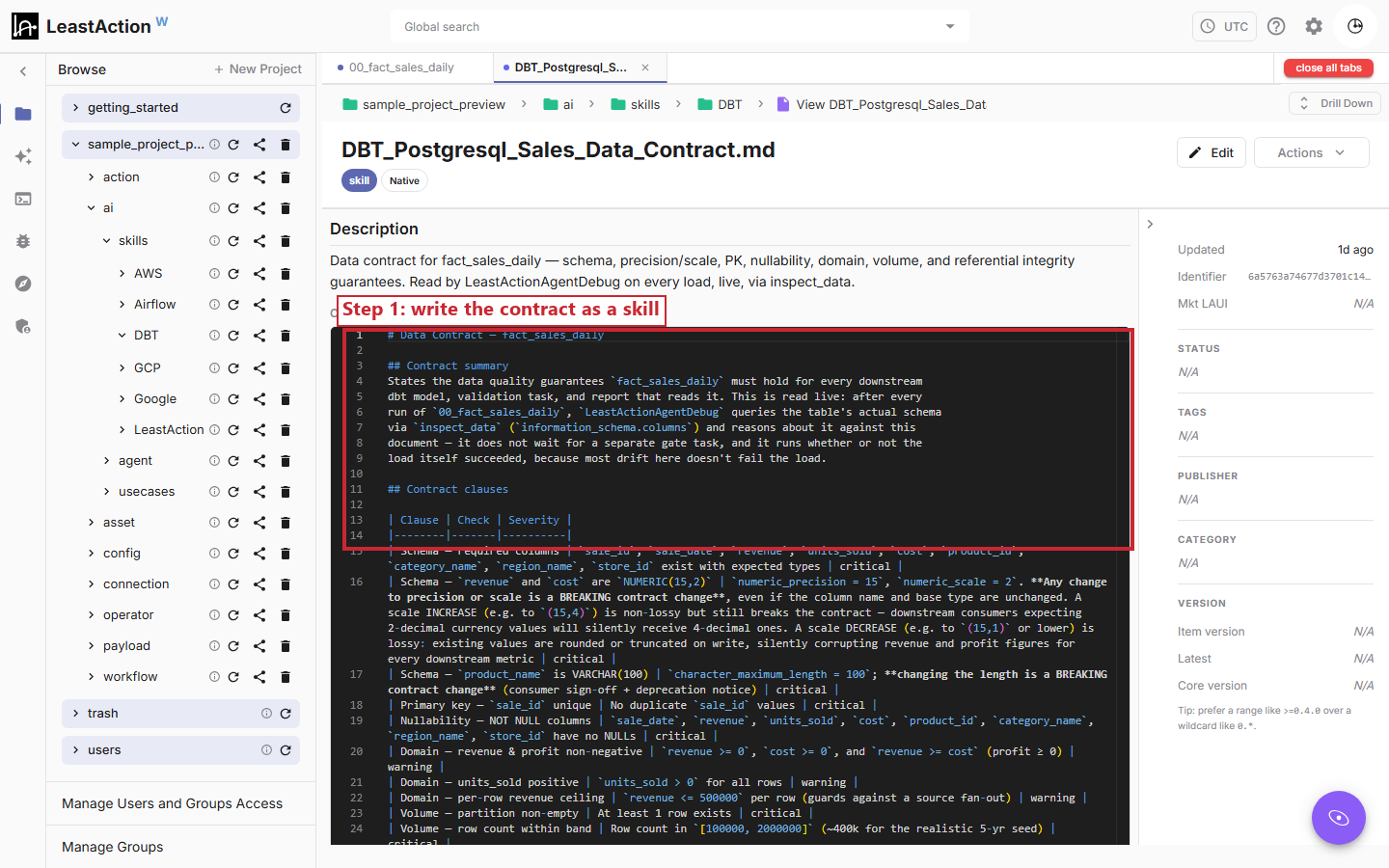
Be specific here. This is the step people get lazy about, and it's the step that decides whether the check is worth anything. A document that only says "revenue is numeric" gives the agent nothing to catch a precision change against. A document that says NUMERIC(15,2) does.
Step 2 - Set the action as a post_action
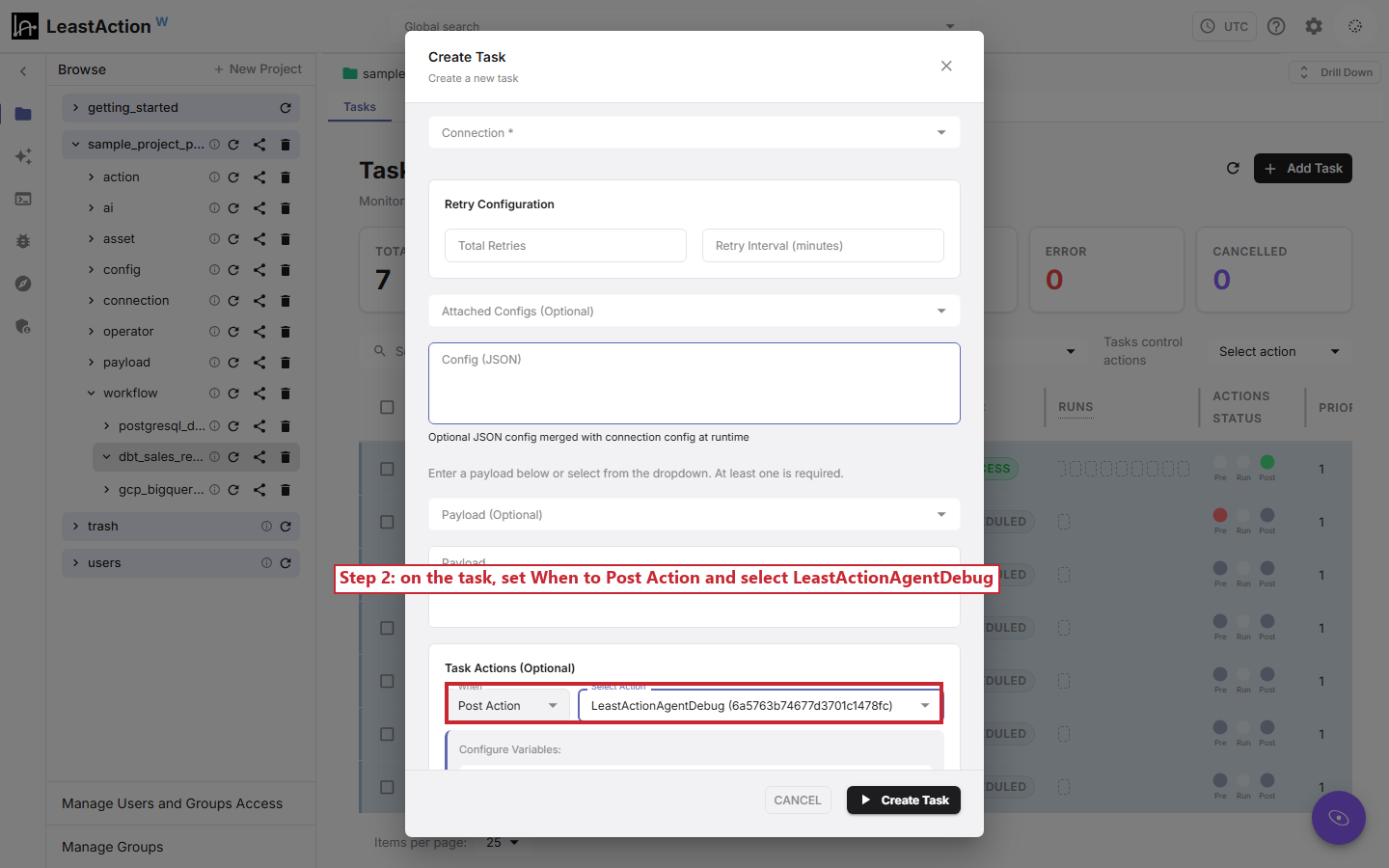
Go to the task that loads the table. In its actions, set When to Post Action and select LeastActionAgentDebug.
That's what tells LeastAction to run the debug check automatically once the load task finishes - whether it succeeded or failed.
Step 3 - Fill in the variables, all in one place
Selecting the action opens Configure Variables, and this is the one place everything gets set:
| Variable | What it does |
|---|---|
| skill_names | Which skill to read as the contract. Exact match on the catalog name, including the .md suffix. |
| ai_connection | Which AI connection to use. |
| enable_tools | Whether the agent can query the live schema. Set alongside source_table. |
| source_table | The table being checked. |
| notify | Where the report goes - the catalog asset folder, plus optionally an email address or Slack webhook. |
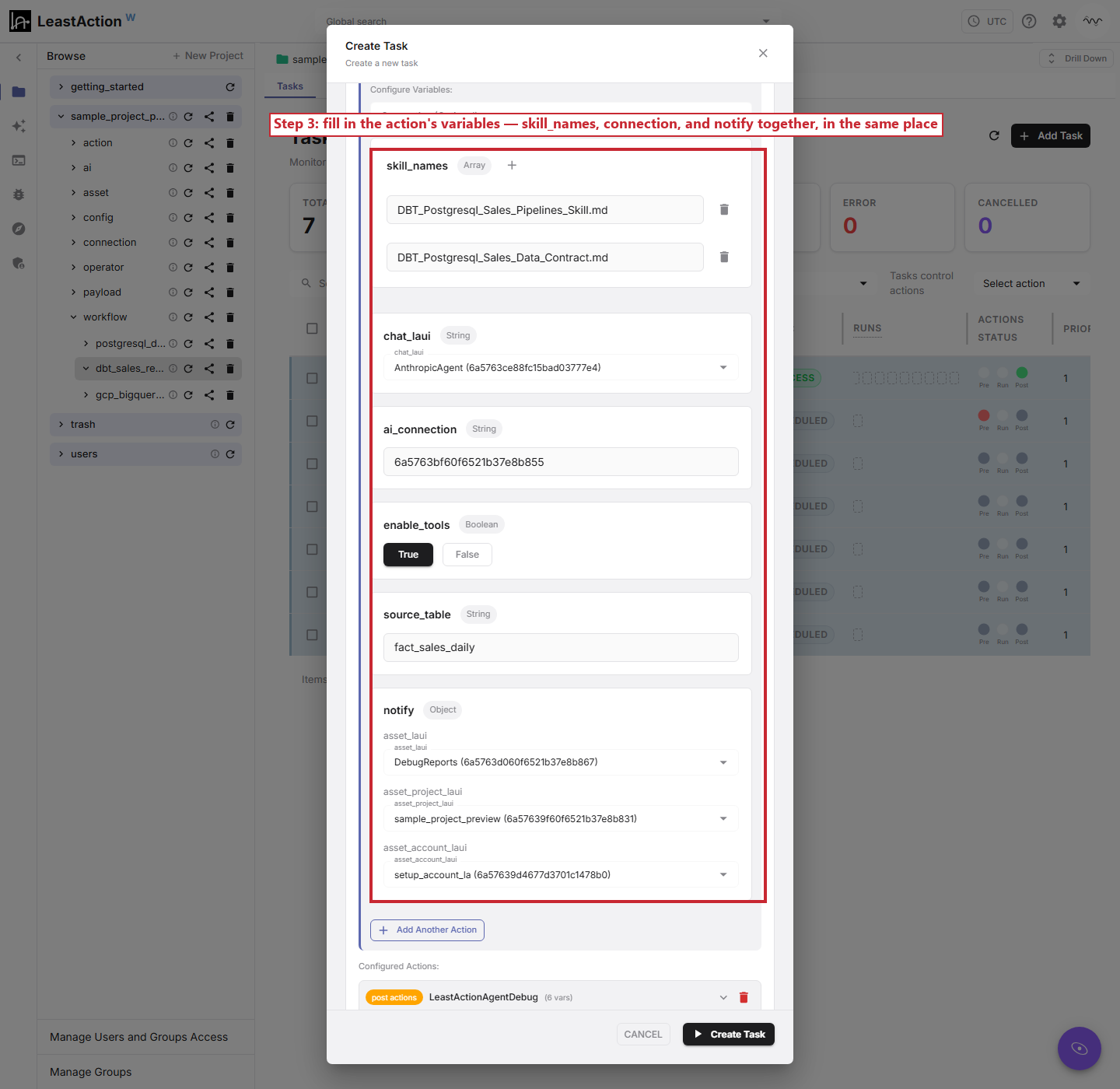
There's no separate step for wiring the skill in first and the connection in later. It's all filled in together, right here.
One thing that trips people up: there's no connection field for the live schema check itself. inspect_data reads through the same connection the task already used to load the table, so you don't enter it twice. ai_connection is the only connection you actually pick here, and it's specifically the one the AI uses to reason and write the report. The database connection is inferred from the task.
Once it's attached, it fires on its own the moment the load task finishes. No separate task to schedule, no gate to keep in sync with the load.
Using it day to day
Step 1 - Just run it
That's it. Run the task as usual. The load executes, and right after, the debug post_action fires on its own. Nobody has to remember to trigger it, and it behaves the same way whether the load succeeded or failed.
Step 2 - Read the result
Behind the scenes, the agent calls inspect_data against the live table, checks what it finds against the contract, and returns a verdict alongside its analysis: whether it found drift, and how serious it is.
Two things happen with that verdict, and they're separate:
- The report is always written to the catalog as an asset. Every run leaves a record, even when nothing's wrong.
- Email and Slack only fire when the verdict says something is actually broken. A clean run doesn't page anyone for no reason.
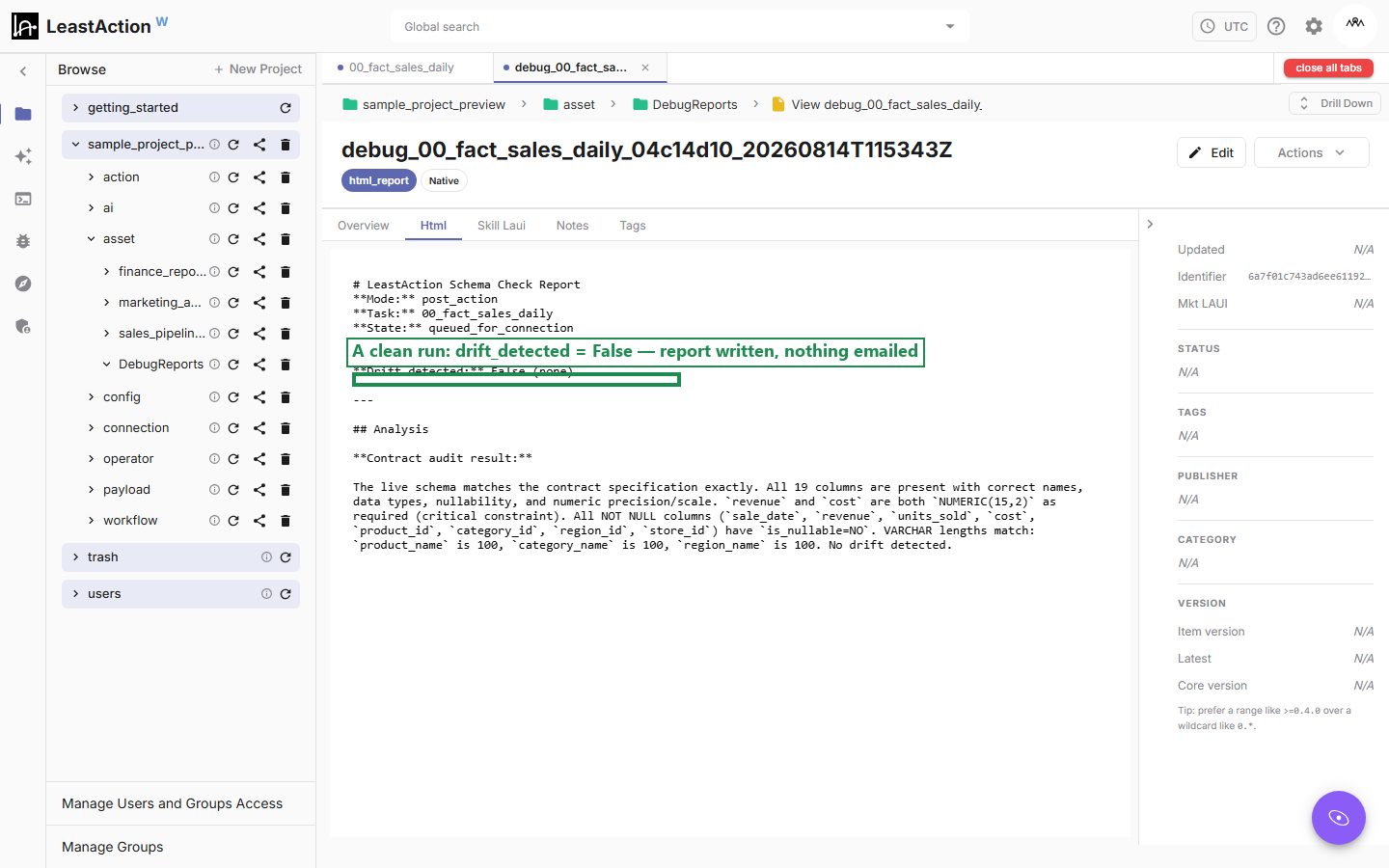
Here's a clean run. The live schema matches the contract, drift_detected is False, the report is saved, and nobody gets an email.
Now here's what a real violation looks like. The contract still says revenue and cost should be DECIMAL(15,2), but the table itself was changed to DECIMAL(15,1) - one decimal place narrower.
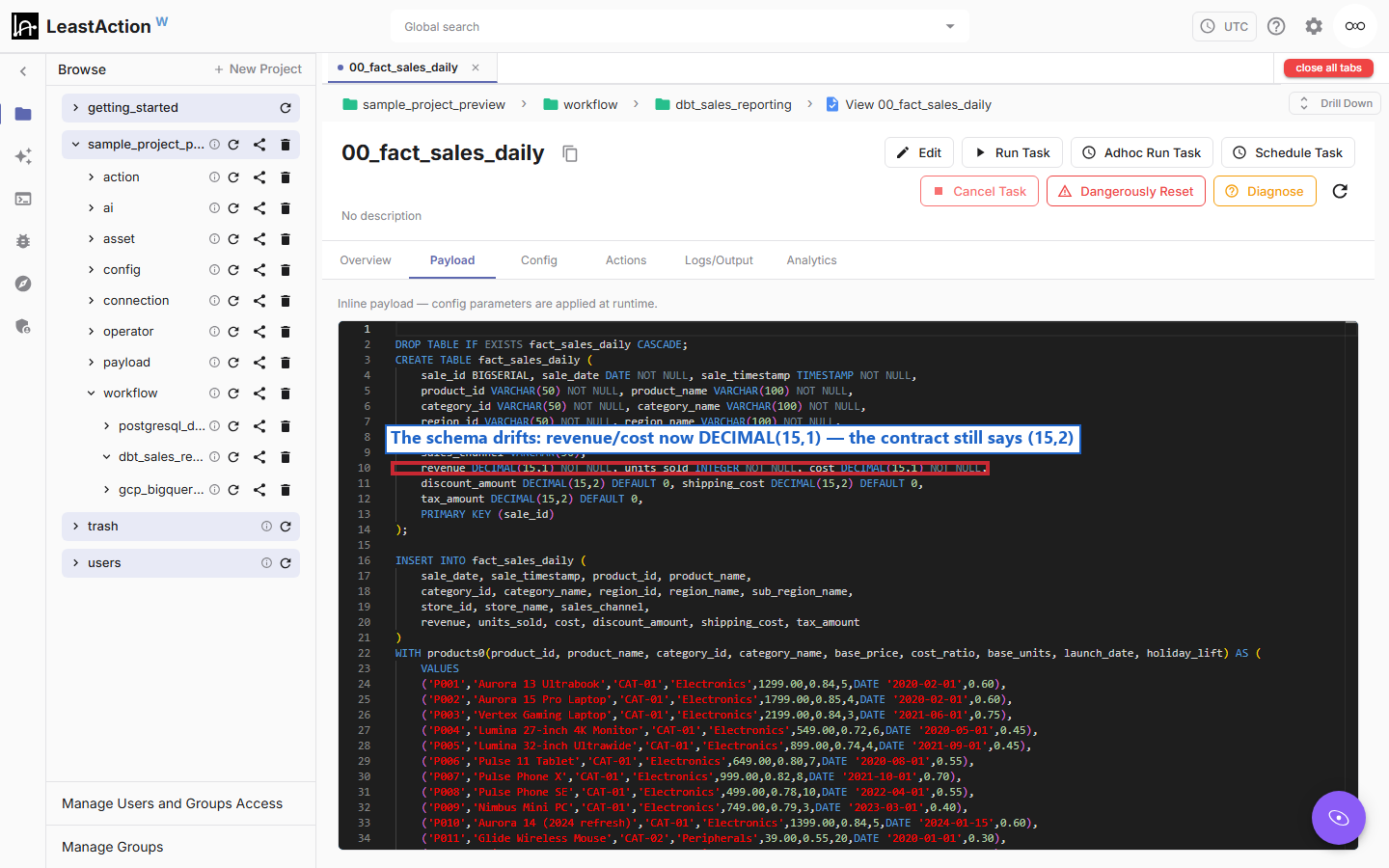
This is meant to stand in for the ordinary kind of mistake people actually make: editing a load script, not realizing a column's precision moved, while the written contract sits there unchanged and quietly out of sync with reality.
Run the task again with that drift in place, and the same check catches it:
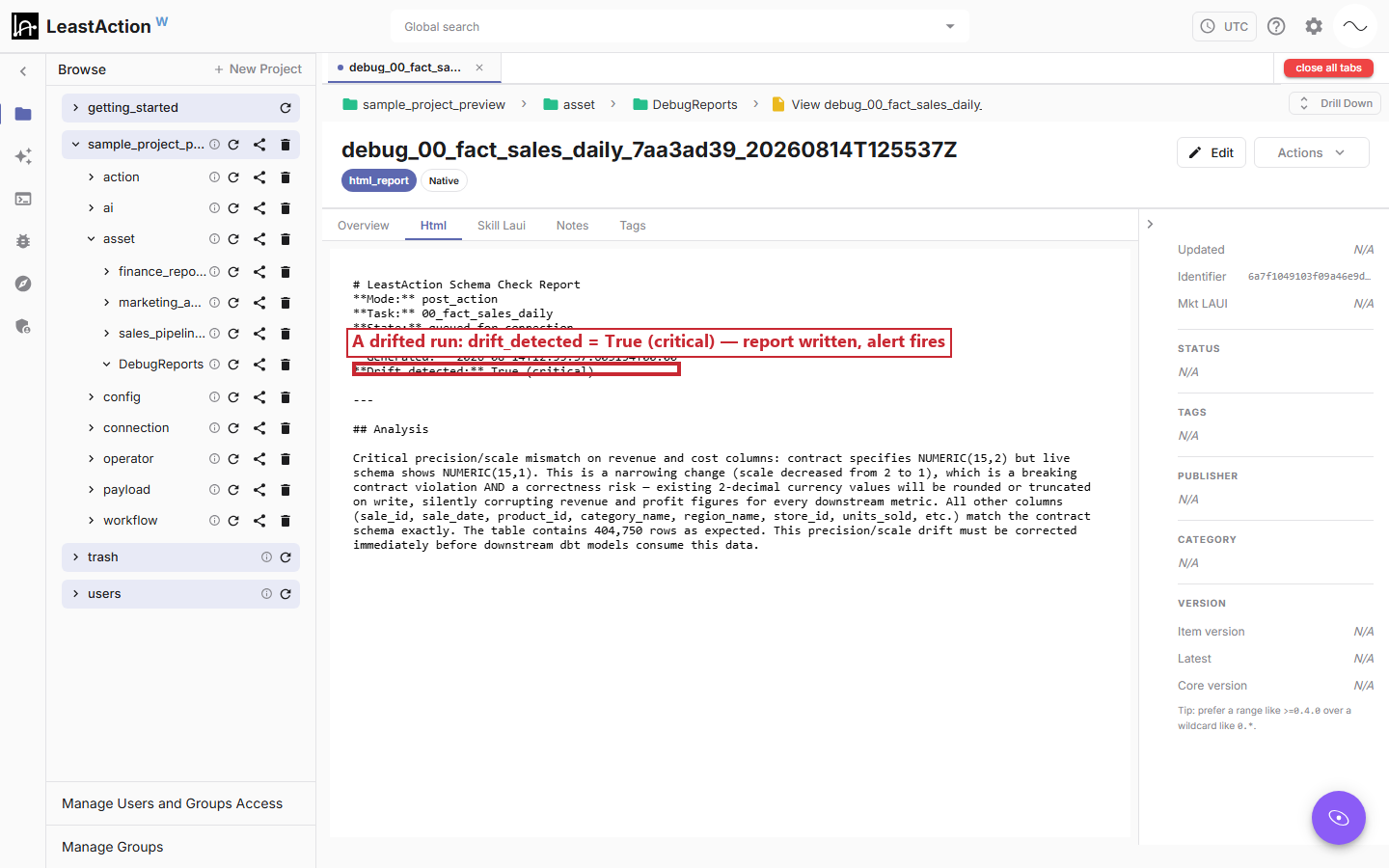
Same report, real violation. drift_detected is True, severity is critical, and the analysis spells out exactly what changed and why it's a correctness risk. This is the run that also triggers the email or Slack alert.
The point
The revenue column losing a decimal place was never going to fail a job. That's exactly why it's dangerous - and exactly why the only reliable way to catch it is to have something ask the question every time, without waiting for a human to get suspicious first.
That's the whole idea. Attach the check to the task. Give it the contract and a way to look at the real table. Let it run on every completion, quietly, and speak up only when something's actually wrong.
LeastAction - source-available, self-hosted data orchestration.
Comments (0)
to join the conversation.
No comments yet — be the first to say something.